yProv4ML

This library is part of the yProv suite, and provides a unified interface for logging and tracking provenance information in machine learning experiments, both on distributed as well as large scale experiments.
It allows users to create provenance graphs from the logged information, and save all metrics and parameters to json format.
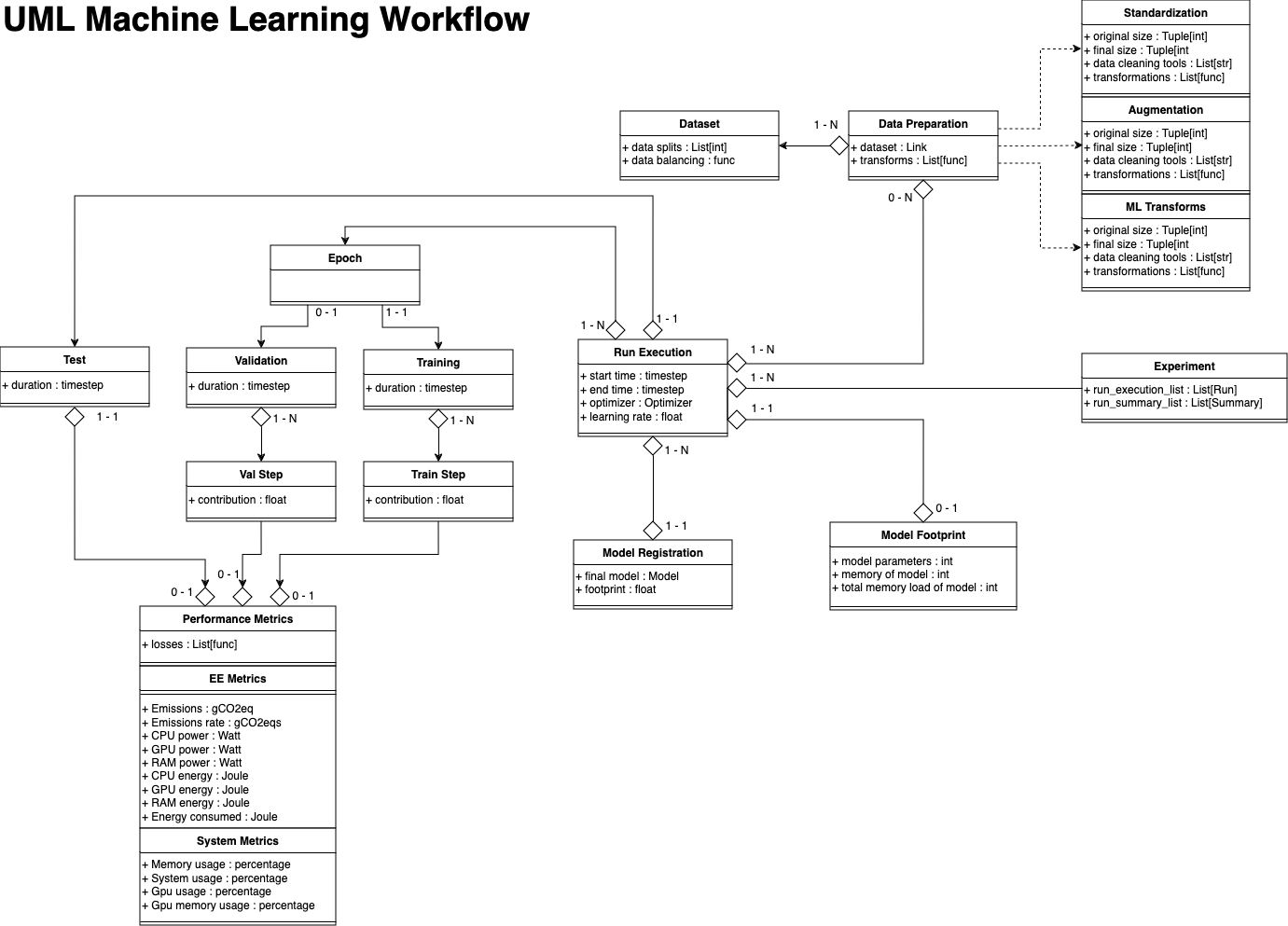
Data Model
Example
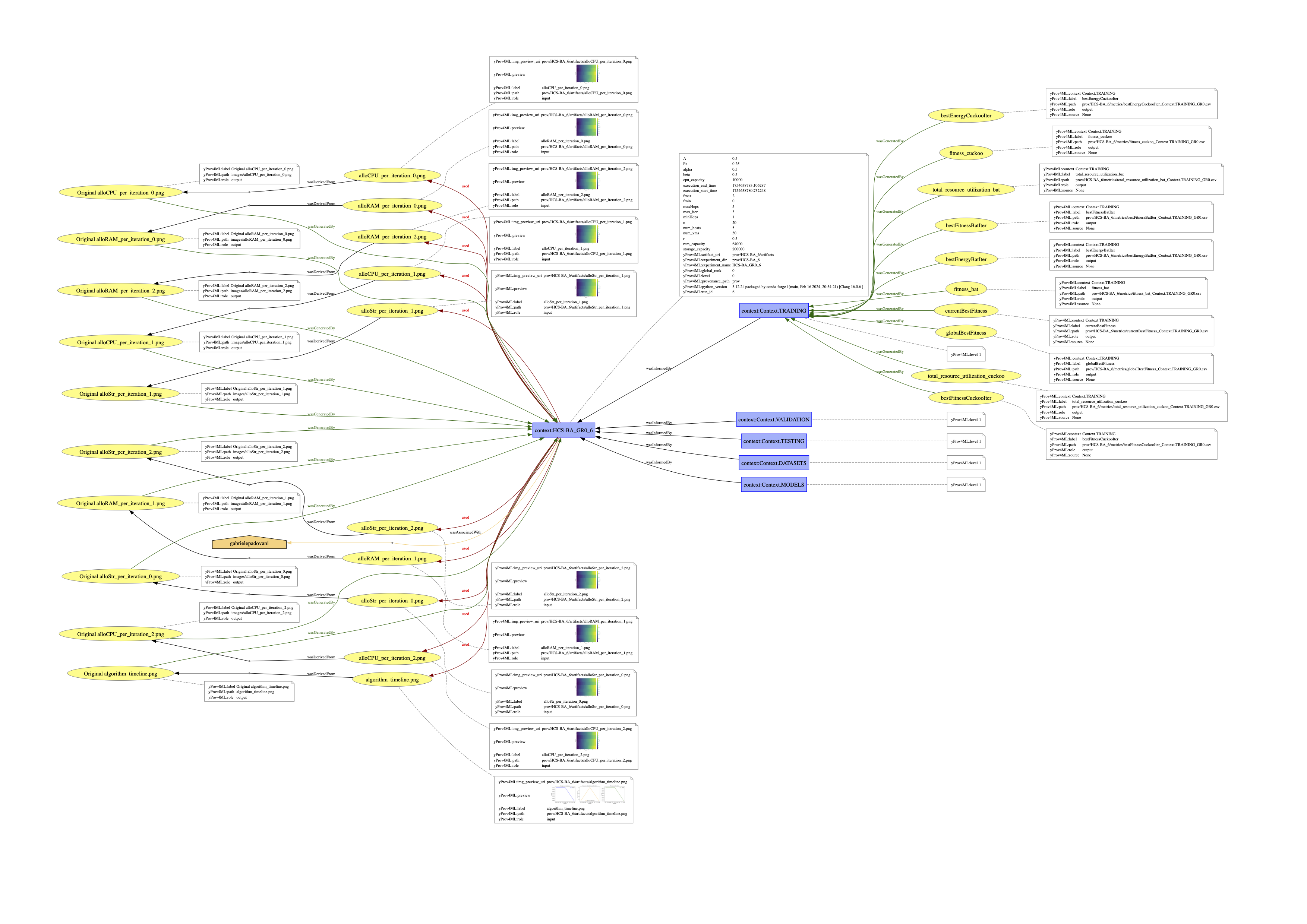
The image shown above has been generated through one of the yProv4ML use cases. Several examples are present in the examples section and provided in the example directory on GitHub.
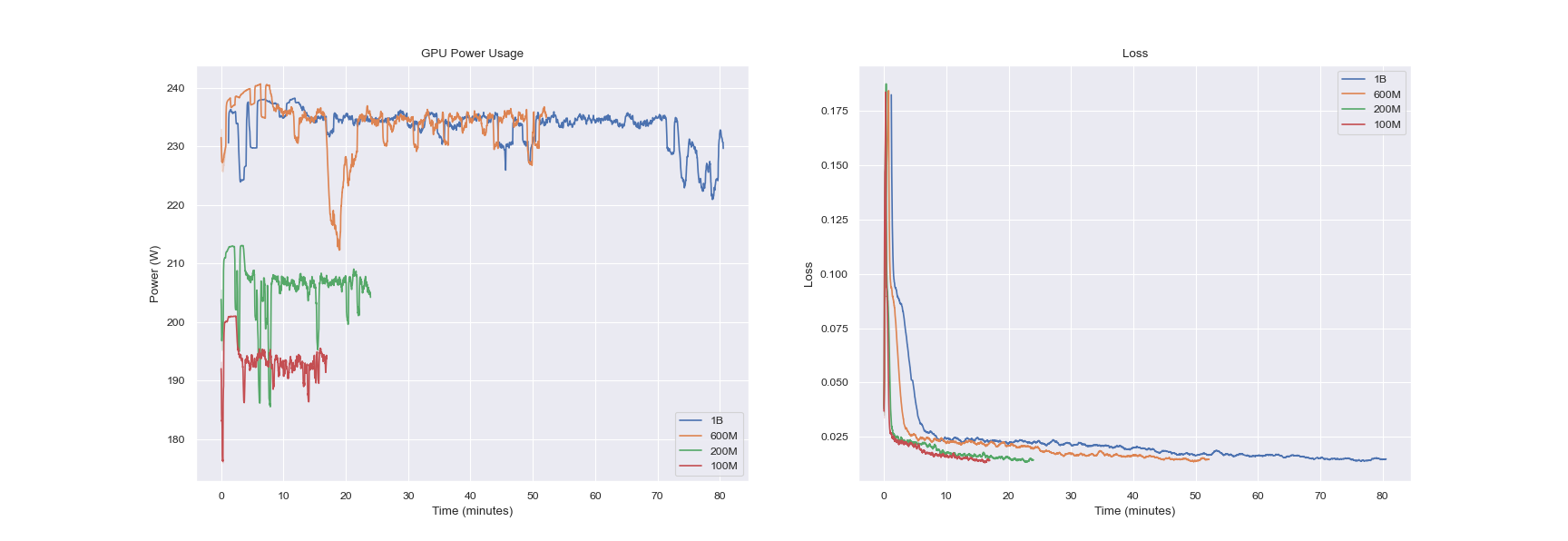
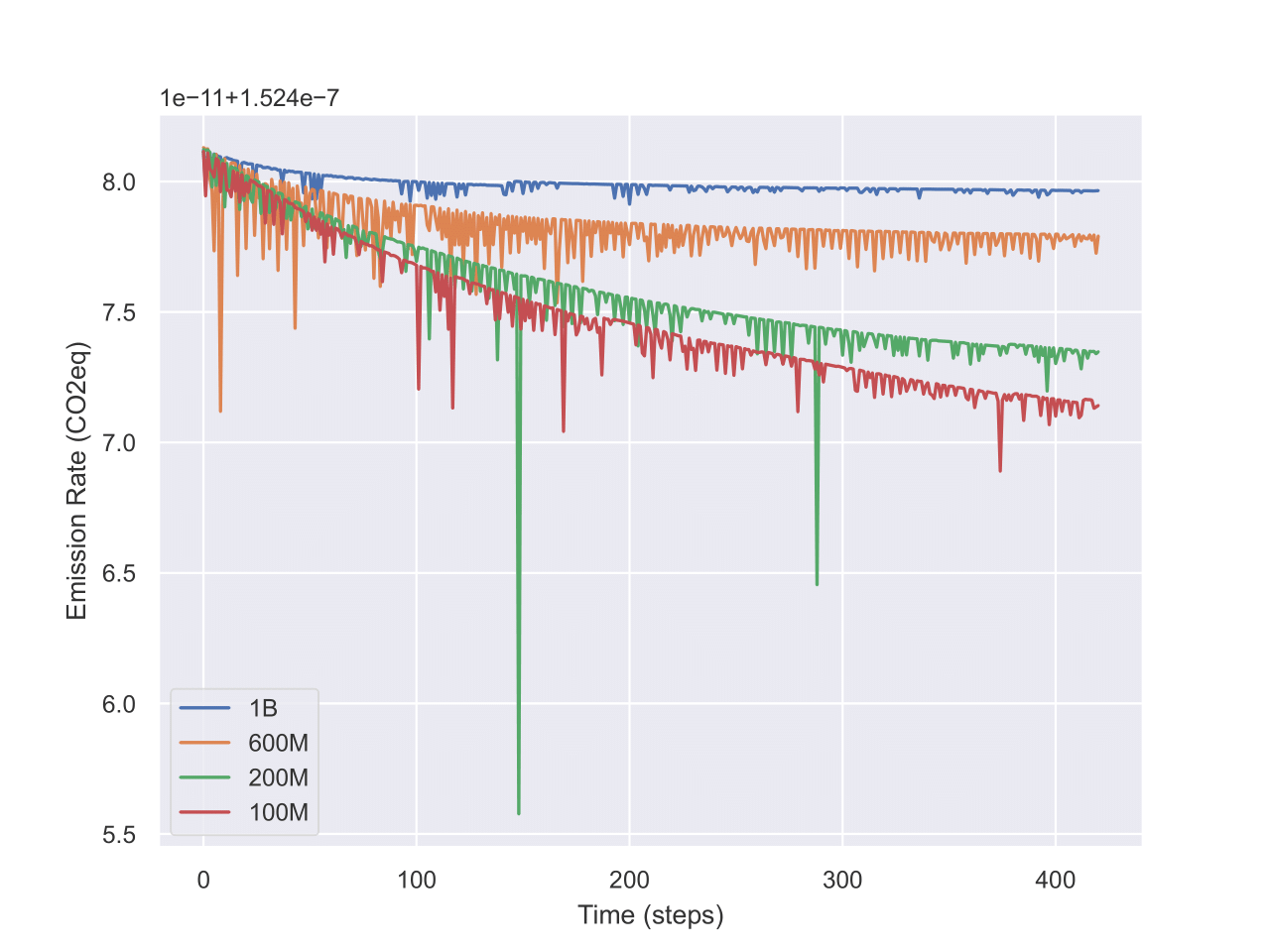
Metrics Visualization
Experiments and Runs
An experiment is a collection of runs where each run is a single execution of a python script.
By changing the experiment_name parameter in the start_run function, the user can create a new experiment.
All artifacts and metrics logged during the execution of the experiment will be saved in the directory specified by the experiment ID. Additionally, a global rank (GR) parameter is tracked, to enable the library to save data in multi-process environments.
Several runs can be executed in the same experiment. All runs will be saved in the same directory (according to the specific experiment name and ID).
Contributors
Former Contributors
Pre-Requisites 🔧
The creation of dot files and svg images for the library is handled through the GraphViz suite. For everything to correctly work, this module has to be installed. We reference both the installation section on their docs, as well as the main ways to install it.
Linux
sudo apt install graphviz
MacOS
# Installing Homebrew
/bin/bash -c "$(curl -fsSL https://raw.githubusercontent.com/Homebrew/install/HEAD/install.sh)"

brew install graphviz
Windows
Installers are at the Download page of GraphViz.
Installation 👷♂️
Install from pip:
pip install yprov4ml

# Or for the legacy version
pip install 'yprov4ml==1.0'
Install from the repository:
git clone https://github.com/HPCI-Lab/yProvML.git
cd yProvML

pip install -r requirements.txt
pip install .

# Or use apple extra if on a Mac
pip install .[apple]

# or install for specific arch
pip install .[nvidia] # or .[amd]
or simply:
pip install --no-cache-dir git+https://github.com/HPCI-Lab/yProvML
To install a specific branch of the library:
git clone https://github.com/HPCI-Lab/yProvML.git
cd yProvML

git switch development # or any other branch

pip install -r requirements.txt
pip install .
Setup
Before using the library, the user must set up the yProv4ML execution, as well as library specific configurations:
prov4ml.start_run(
    experiment_name: str,
    prov_user_namespace: Optional[str] = None,
    provenance_save_dir: Optional[str] = None,
    collect_all_processes: Optional[bool] = False,
    save_after_n_logs: Optional[int] = 100,
    rank : Optional[int] = None,
    metrics_file_type: str = "csv",
    csv_separator : str = ",",
    use_compressor: Optional[Union[str, bool]] = None,
    use_run_id: Optional[int] = None,
)
The parameters are as follows:
| Parameter | Type | Description |
|---|---|---|
experiment_name | string | Required. Name of the experiment |
prov_user_namespace | string | Optional. User namespace for the provenance graph |
prov_save_path | string | Optional. Directory to save the provenance graph |
collect_all_processes | bool | Optional. Whether to collect all processes |
save_after_n_logs | int | Optional. Save the graph after n logs |
rank | int | Optional. Rank of the process |
metrics_file_type | MetricsType | Optional. File format in which to save metrics, can be MetricsType.ZARR, MetricsType.CSV, MetricsType.NETCDF |
csv_separator | str | Optional. Separator used if metrics_file_type is MetricsType.CSV. |
disable_codecarbon | Optional[bool] | Optional. Whether to use codecarbon to calculate stats. |
use_compressor | Optional[CompressorType] | Optional. Type of compressor used to create the run zip. If None, then no compression is applied. |
prov_user_namespace is a required string that defines the namespace under which all provenance data will be grouped. It helps in logically separating and organizing data across different users or projects, ensuring that the provenance graph remains structured and easily navigable.
collect_all_processes: A boolean flag that, when set to True, enables the collection of provenance data from all processes, which is particularly useful in multi-processing or distributed computing environments. By default, this is False, meaning only the main process (at rank 0) will be monitored unless otherwise specified.
save_after_n_logs: An optional integer that determines how frequently the provenance graph should be saved based on the number of logs collected. For example, if set to 100, the graph will be saved every 100 logs. This is essentially a caching system, which balances between execution time and RAM usage.
rank: This optional integer is used in distributed settings to specify the rank or ID of the currently collecting process. Leaving this parameter empty and collect_all_processes to False implies that only the process at rank 0 will collect data.
disable_codecarbon: An optional boolean that controls whether the CodeCarbon tool is used for tracking the environmental impact of the experiment (e.g., carbon emissions). Setting this to True disables CodeCarbon integration, which can be useful in environments where this measurement is not needed or supported.
At the end of the experiment, the user must end the run:
prov4ml.end_run(
    create_graph: Optional[bool] = False,
    create_svg: Optional[bool] = False,
    crate_ro_crate: Optional[bool]=False,
)
| Parameter | Type | Description |
|---|---|---|
create_graph | Optional[bool] | Optional. Whether to create the graph |
create_svg | Optional[bool] | Optional. Whether to create the svg |
crate_ro_crate | Optional[bool] | Optional. Indicates whether to pack the experiment in a ro-crate zip, containing all the run's information. |
This call allows the library to save the provenance graph in the specified directory.
We allow to pack the entire experiment data as a RO-Crate to enable the user to easily share the final execution of his experiment.
Provenance Graph Creation (GraphViz)
The standard method to generate the .dot file containing the provenance graph is to set the create_graph parameter to True.
If the user necessitates to turn a PROV-JSON created with yProv4ML into a .dot file, the following code command can be used:
python -m yprov4ml.prov2dot --prov_json prov.json --output prov_graph.dot
Provenance Graph Image (SVG)
The standard method to generate the .svg image of the provenance graph is to set the create_svg parameter to True.
In this case both create_graph and create_svghave to be set to True.
If the user necessitates to turn a .dot file into a .svg file, the following code command can be used:
python -m yprov4ml.dot2svg --dot prov_graph.dot --output prov_graph.svg
Or alternatively, using directly the Graphviz suite:
dot -Tsvg -O prov_graph.dot
General Logging
When logging parameters and metrics, the user must specify the context of the information (string indicating, for instance, "Training", "Validation", "Testing").
Log Parameters
To specify arbitrary training parameters used during the execution of the experiment, the user can call the following function.
prov4ml.log_param(
    key: str,
    value: Any,
    context : Optional[str] = None,
    source : Optional[str] = None,
    is_input : Optional[bool] = False
)
| Parameter | Type | Description |
|---|---|---|
key | string | Required. Name of the parameter |
value | string | Required. Value of the parameter |
context | Optional[str] | Optional. Indicates which context to add the parameter to |
source | Optional[str] | Optional. Indicates the source of the coming information |
is_input | Optional[bool] | Optional. Indicates whether the parameter is an input |
Log Artifacts
To log artifacts, the user can call the following function.
prov4ml.log_artifact(
    artifact_name : str,
    artifact_path : str,
    context: Optional[str] = None,
    step: Optional[int] = None,
    log_copy_in_prov_directory : bool = True,
    is_model : bool = False,
    is_input : bool = False,
)
| Parameter | Type | Description |
|---|---|---|
artifact_name | string | Required. Label to give to the artifact |
artifact_path | string | Required. Path to the artifact |
context | Optional[prov4ml.str] | Required. str of the artifact |
step | Optional[int] | Optional. Step of the artifact |
log_copy_in_prov_directory | bool | Optional. Copies file in artifact directory |
is_input | bool | Optional. Indicates that the artifact is used as input to the training process. |
The function logs the artifact in the current experiment. The artifact can be a file or a directory.
All logged artifacts are saved in the artifacts directory of the current experiment, while the related information is saved in the PROV-JSON file, along with a reference to the file.
The value parameter can be any artifact, a file, a path, a value. yProv4ML identifies the correct way to store this parameter in memoty and connect it to the provenance file.
If log_copy_in_prov_directory is True, the file at the specified value parameter is copied inside the artefacts directory.
If is_input is True, the artifacts will be referenced as such in the W3C prov standard. An example of this would be pretrained model weights.
Log Models
prov4ml.log_model(
    model_name: str,
    model: Union[torch.nn.Module, Any],
    log_model_info: bool = True,
    log_model_layers : bool = False,
    is_input: bool = False,
)
| Parameter | Type | Description |
|---|---|---|
model_name | string | Required. Name of the model |
model | Union[torch.nn.Module, Any] | Required. The model to be logged |
log_model_info | bool | Optional. Whether to log model information |
log_model_layers | bool | Optional. Whether to log model layers |
is_input | bool | Optional. Indicates that the model is used as input to the training process |
It sets the model for the current experiment. It can be called anywhere before the end of the experiment.
The same call also logs some model information, such as the number of parameters and the model architecture memory footprint.
The saving of these information can be toggled with the log_model_info = False parameter.
The model layers details can be logged in an external .json file, which will be linked to the provenance file as an artefact.
The parameters saved for each layer depend on the type of the latter, but generally include input and output size, as well as dtype.
prov4ml.save_model_version(
    model_name: str,
    model: Union[torch.nn.Module, Any],
    context: Optional[str] = None,
    step: Optional[int] = None,
    incremental : bool = True,
    is_input : bool =False,
)
The save_model_version function saves the state of a PyTorch model and logs it as an artifact, enabling version control and tracking within machine learning experiments.
| Parameter | Type | Description |
|---|---|---|
model_name | str | Required. The name under which to save the model. |
model | torch.nn.Module | Required. The PyTorch model to be saved. |
context | Optional[str] | Optional. The context in which the model is saved. |
step | Optional[int] | Optional. The step or epoch number associated with the saved model. |
incremental | bool | Optional. Indicates whether there will be multiple versions of this model. |
is_input | bool | Optional. Indicates that the model is used as input to the training process. |
This function saves the model's state dictionary to a specified directory and logs the saved model file as an artifact for provenance tracking. It ensures that the directory for saving the model exists, creates it if necessary, and uses the torch.save method to save the model. It then logs the saved model file using log_artifact, associating it with the given context and optional step number.
If save_model_version is called several times with incremental = True, yProv4ML creates an incremental id for each model variation, and saves all in a sub-directory.
Log Datasets
yProv4ML offers helper functions to log information and stats on specific datasets.
prov4ml.log_dataset(
    dataset_label : str,
    dataset : Union[DataLoader, Subset, Dataset],
    log_dataset_info : bool = True
)
| Parameter | Type | Description |
|---|---|---|
dataset_label | string | Required. The label of the dataset |
dataset | Union[DataLoader, Subset, Dataset] | Required. The dataset to be logged |
log_dataset_info | bool | Optional. Whether to log the dataset information |
The function logs the dataset in the current experiment. The dataset can be a DataLoader, a Subset, or a Dataset class from pytorch. Parameters which are logged include batch size, number of workers, whether the dataset is shuffled, the number of batches and the number of total samples.
Logging through Wrappers
yProv4ML offers helper wrappers to log information automatically.
ProvenanceTrackedFunction
class ProvenanceTrackedFunction:
    def __init__(self,
        func : Any,
        context : Optional[str] = None
    )
| Parameter | Type | Default | Description |
|---|---|---|---|
| func | Any | Required | The target callable function or object to wrap (e.g., PyTorch loss function or metric evaluator). |
| context | Optional[str] | None | Optional execution context or stage name (e.g. "training", "validation"). |
ProvenanceTrackedModel
class ProvenanceTrackedModel(nn.Module):
    def __init__(self,
        model_label : str,
        model : Any,
        context : Optional[str] = None,
        chunk_size : int = 64
    )
| Parameter | Type | Default | Description |
|---|---|---|---|
model_label | str | Required | Label identifier for the model. Used as the output Zarr dataset name (<model_label>.zarr). |
model | Any (nn.Module) | Required | The underlying PyTorch model instance to track. |
context | Optional[str] | None | Optional execution context (e.g. stage or step name) associated with provenance tracking. |
chunk_size | int | 64 | Zarr chunk dimension along the batch axis for layer datasets. |
Metrics 📊
This section covers the different types of metrics which can be collected using yProv4ml. These metrics provide insights into efficiency, resource usage, and overall effectiveness. Below is an overview of the key metric categories:
- General Metrics: Covers customized, user-defined metrics
- System Metrics: Covers performance-related metrics such as CPU usage, memory consumption, and GPU stats.
- Time Metrics: Offers directives for time-based measurements.
- Registering Metrics: Offers the ability to pre-process data "in-situ".
Each subsection provides detailed explanations and methodologies for tracking and interpreting these metrics.
Custom Metrics
Log Metrics
To specify metrics, which can be tracked during the execution of the experiment, the user can call the following function.
prov4ml.log_metric(
    key: str,
    value: float,
    context: Optional[str] = None,
    step: int = 0,
    source: Optional[str] = None,
    timestamp : int = 0
)
| Parameter | Type | Description |
|---|---|---|
key | string | Required. Name of the metric |
value | float | Required. Value of the metric |
context | Optional[prov4ml.str] | Required. str of the metric |
step | Optional[int] | Optional. Step of the metric |
source | Optional[str] | Optional. Source of the metric |
timestamp | Optional[str] | Optional. The time of logging of the current item in the metric |
The step parameter is optional and can be used to specify the current time step of the experiment, for example the current epoch, it defaults to 0. In a similar manner, the context parameter can also be omitted, and it will default to the main experiment context. The source parameter is optional and can be used to specify the source of the metric, so for example which library the data comes from. If omitted, yProv4ML will try to automatically determine the origin.
System Metrics
The prov4ml.log_system_metrics function logs critical system performance metrics during machine learning experiments. The information logged is related to the time between the last call to the function and the current call.
prov4ml.log_system_metrics(
    context: Context,
    step: Optional[int] = None,
)
| Parameter | Type | Description |
|---|---|---|
context | prov4ml.Context | Required. Context of the metric |
step | int | Optional. Step of the metric |
This function logs the following system metrics:
| Parameter | Description | Unit |
|---|---|---|
cpu_usage_pct | CPU utilization percentage | % |
cpu_power | Power consumed by the CPU | Watts (W) |
cpu_energy | Energy consumed by the CPU over the logging interval | Joules (J) |
ram_usage_pct | Percentage of total RAM used | % |
ram_usage_gb | Amount of RAM used in gigabytes | Gigabytes (GB) |
ram_power | Power consumed by the system RAM | Watts (W) |
ram_energy | Energy consumed by RAM over the logging interval | Joules (J) |
disk_usage_gb | Amount of disk space used in gigabytes | Gigabytes (GB) |
disk_usage_pct | Percentage of total disk space used | % |
gpu_usage_pct | GPU compute utilization percentage | % |
gpu_power | Power consumed by the GPU | Watts (W) |
gpu_energy | Energy consumed by the GPU over the logging interval | Joules (J) |
gpu_memory_usage_gb | Amount of GPU VRAM used in gigabytes | Gigabytes (GB) |
gpu_memory_usage_pct | Percentage of GPU VRAM used | % |
gpu_memory_power | Power consumed by the GPU VRAM module | Watts (W) |
gpu_temperature_c | Temperature of the GPU core | Degrees Celsius (°C) |
FLOPs per Epoch
The log_flops_per_epoch function logs the number of floating-point operations (FLOPs) performed per epoch for a given model and dataset.
prov4ml.log_flops_per_epoch(
    label: str,
    model: Union[torch.nn.Module, Any],
    dataset: Union[torch.utils.data.Dataset, torch.utils.data.DataLoader, torch.utils.data.Subset],
    context: Context,
    step: Optional[int] = None
):
| Parameter | Type | Description |
|---|---|---|
label | string | Required. Label of the FLOPs |
model | Union[torch.nn.Module, Any] | Required. Model used for the FLOPs calculation |
dataset | string | Required. Dataset used for the FLOPs calculation |
context | prov4ml.Context | Required. Context of the metric |
step | int | Optional. Step of the metric |
FLOPs per Batch
The log_flops_per_batch function logs the number of floating-point operations (FLOPs) performed per batch for a given model and batch of data.
prov4ml.log_flops_per_batch(
    label: str,
    model: Union[torch.nn.Module, Any],
    batch: Any,
    context: Context,
    step: Optional[int] = None,
):
| Parameter | Type | Description |
|---|---|---|
label | string | Required. Label of the FLOPs |
model | Union[torch.nn.Module, Any] | Required. Model used for the FLOPs calculation |
batch | Any | Required. Batch of data used for the FLOPs calculation |
context | prov4ml.Context | Required. Context of the metric |
step | int | Optional. Step of the metric |
Execution Time
prov4ml.log_current_execution_time(
    label: str,
    context: Context,
    step: Optional[int] = None
)
| Parameter | Type | Description |
|---|---|---|
label | string | Required. Label of the code portion |
context | prov4ml.Context | Required. Context of the metric |
step | int | Optional. Step of the metric |
Reproducing Experiments using Provenance Files
With workflow streamlined by yProv4ML, it is trivial to guarantee reproducibility of experiments even just sharing a single provenance file. To guarantee the necessary amount of information are present in the prov.json file however, some calls to the library have to be executed.
def log_execution_command(cmd : str, path : str): ...
Simply logs the execution command for it to be retrieved by the reproduction script later. This is often a call to python3
def log_source_code(): ...
Logs as an artifact a path to the source code. This could be a single python file (e.g. main.py), a repository link (if the path is not specified in the arguments), or an entire directory of source files. In case the source code is not on github, the source files are all copied inside the artifacts directory, and the path logged inside the provenance file will reference whis copy.
Querying from Provenance Files
yProv4ml offers a set of directives to easily extract the information logged from the provenance.json file.
Example:
from yprov4ml import (
    list_activities,
    list_entities,
    get_parameter,
    list_parameters,
    list_metrics,
    list_metric_paths,
    get_metric
)

import json
data = json.load(open(path_to_prov_json))
### Utility Functions
Listing Functions
def list_activities(source : dict | str) -> list[str]
def list_entities(source : dict | str, entity_type: str | None = None) -> list[str]
list_activities: Retrieves a list of all activity names stored in the provenance document.list_entities: Retrieves a list of entity names from the provenance document. Can be filtered by passing an explicitentity_type(e.g.,"provml:Metric").
Parameter Retrieval
def get_parameter(source : dict | str, name: str, param: str, unwrap: bool = True) -> Any
Retrieves a single parameter value associated with a specified activity or entity key name.
| Parameter | Type | Default | Description |
|---|---|---|---|
source | dict \| str | Required | Loaded PROV dictionary or file path. |
name | str | Required | Name of the activity or entity. |
param | str | Required | Specific attribute or parameter key to extract. |
unwrap | bool | True | Automatically unwraps PROV typed-literals into native Python values. |
def list_parameters(data : dict | str, name: str | None = None, unwrap: bool = True) -> dict[str, Any]
Retrieves a dictionary of key-value parameters. If name is omitted, it aggregates parameters across all entities and activities in the file.
| Parameter | Type | Default | Description |
|---|---|---|---|
data | dict \| str | Required | Loaded PROV dictionary or file path. |
name | str \| None | None | Target activity/entity name. If None, extracts all available parameters. |
unwrap | bool | True | Automatically unwraps PROV typed-literals into native Python values. |
Metric Management
def list_metrics(data : dict | str, context: str | None = None, source: str | None = None) -> pd.DataFrame
Summarizes all metric entities recorded in the provenance JSON into a single Pandas DataFrame with metadata columns (label, context, source, csv_path).
def list_metric_paths(data : dict | str, context: str | None = None, source : str | None = None, file_type : str | None = None) -> dict[str, str]
Returns a dictionary mapping metric entity identifiers to their underlying dataset file paths.
def get_metric(data : dict | str, name: str | None = None, context: str | None = None, source : str | None = None)
Fetches and automatically loads the data object for a metric (named in the format {name}_{context}_{source}) using the appropriate reader.
Project Helpers
def list_runs_in_proj(path: str | Path) -> list[Path]
def list_provjson_in_proj(path : str | Path) -> list[Path]
list_runs_in_proj: Returns paths to all run subdirectories found within a given project folder.list_provjson_in_proj: Searches across run directories to locate all available.jsonprovenance files.
Examples
A set of 5 examples are provided:
- PyTorch Example
- PyTorch Lightning Example
- ItwinAI Logger Example
- Viewing and Plotting Data
- Reproducible Example
- Visualization Notebook
Example of usage with PyTorch
This section provides an example of how to use Prov4ML with PyTorch.
The following code snippet shows how to log metrics, system metrics, carbon metrics, and model versions in a PyTorch training loop.
Example:
import torch
import torch.nn as nn
import torch.nn.functional as F
from torchvision.datasets import MNIST
from torchvision import transforms
from torch.utils.data import DataLoader, Subset
from tqdm import tqdm
import prov4ml

PATH_DATASETS = "./data"
BATCH_SIZE = 32
EPOCHS = 15
DEVICE = "cpu"
TYPE = prov4ml.MetricsType.ZARR
COMP = False

# Start a new provenance logging run.
# Specify the user namespace, experiment name,
# and directory to store the provenance data.
# The graph is saved every 100 logs.
prov4ml.start_run(
    prov_user_namespace="www.example.org",
    experiment_name=f"{TYPE}_{COMP}",
    provenance_save_dir="prov",
    save_after_n_logs=100,
    collect_all_processes=True,
    disable_codecarbon=True,
    metrics_file_type=TYPE,
    use_compressor=COMP,
    unify_experiments=False
)

class MNISTModel(nn.Module):
    def __init__(self):
        super().__init__()
        self.model = torch.nn.Sequential(
            torch.nn.Linear(28 * 28, 10),
        )

    def forward(self, x):
        return self.model(x.view(x.size(0), -1))

mnist_model = MNISTModel().to(DEVICE)

tform = transforms.Compose([
    transforms.RandomRotation(10),
    transforms.RandomHorizontalFlip(),
    transforms.RandomVerticalFlip(),
    transforms.ToTensor()
])
# Log the transformation applied to the dataset as a parameter.
prov4ml.log_param("dataset transformation", tform)

train_ds = MNIST(PATH_DATASETS, train=True, download=True, transform=tform)
train_loader = DataLoader(train_ds, batch_size=BATCH_SIZE)
# Log metadata about the training dataset (e.g., source, size, structure).
prov4ml.log_dataset("train_dataset", train_loader)

test_ds = MNIST(PATH_DATASETS, train=False, download=True, transform=tform)
test_loader = DataLoader(test_ds, batch_size=BATCH_SIZE)
# Log metadata about the validation dataset.
prov4ml.log_dataset("val_dataset", test_loader)

optim = torch.optim.Adam(mnist_model.parameters(), lr=0.001)
# Log the optimizer type used in training.
prov4ml.log_param("optimizer", "Adam")

loss_fn = nn.MSELoss().to(DEVICE)
# Log the loss function used to compute training and validation loss.
prov4ml.log_param("loss_fn", "MSELoss")

losses = []
for epoch in range(EPOCHS):
    mnist_model.train()
    for i, (x, y) in tqdm(enumerate(train_loader)):
        x, y = x.to(DEVICE), y.to(DEVICE)
        optim.zero_grad()
        y_hat = mnist_model(x)
        y = F.one_hot(y, 10).float()
        loss = loss_fn(y_hat, y)
        loss.backward()
        optim.step()
        losses.append(loss.item())

        # Log the training loss value for the current step (epoch).
        # The context "TRAINING" indicates it's during the training phase.
        prov4ml.log_metric("Loss", loss.item(), context=prov4ml.Context.TRAINING, step=epoch)
        # Log environmental metrics such as carbon emissions produced during training.
        # Requires CodeCarbon, throws exception if disabled.
        prov4ml.log_carbon_metrics(prov4ml.Context.TRAINING, step=epoch)
        # Log system-level metrics such as CPU/memory usage during training.
        prov4ml.log_system_metrics(prov4ml.Context.TRAINING, step=epoch)
    # Save the current version of the model with a label and with Context TRAINING.
    # The model weights are saved incrementally in the experiment directory
    prov4ml.save_model_version("mnist_model_version", mnist_model, prov4ml.Context.TRAINING)

    mnist_model.eval()
    for i, (x, y) in tqdm(enumerate(test_loader)):
        x, y = x.to(DEVICE), y.to(DEVICE)
        y_hat = mnist_model(x)
        y2 = F.one_hot(y, 10).float()
        loss = loss_fn(y_hat, y2)

        # Log the validation loss value for the current step (epoch).
        # The context "VALIDATION" indicates it's during this latter phase.
        prov4ml.log_metric("Loss", loss.item(), prov4ml.Context.VALIDATION, step=epoch)

# Log the final trained model under a given name.
# This allows later retrieval, sharing, or deployment of the model.
prov4ml.log_model("mnist_model_final", mnist_model)
# Ends the current run and finalizes provenance logging.
# If `create_graph` is True, it generates a complete provenance graph.
# If `create_svg` is True, an SVG visualization of the graph is also created.
prov4ml.end_run(create_graph=True, create_svg=True, create_rocrate=True)
Example of usage with PyTorch Lightning
This section provides an example of how to use Prov4ML with PyTorch Lightning.
In any lightning module the calls to train_step, validation_step, and test_step can be overridden to log the necessary information.
Example:
def training_step(self, batch, batch_idx):
    x, y = batch
    y_hat = self(x)
    loss = self.loss(y_hat, y)
    prov4ml.log_metric("MSE_train", loss, prov4ml.Context.TRAINING, step=self.current_epoch)
    prov4ml.log_flops_per_batch("train_flops", self, batch, prov4ml.Context.TRAINING,step=self.current_epoch)
    return loss
This will log the mean squared error and the number of flops per batch for each the training step.
Alternatively, the on_train_epoch_end method can be overridden to log information at the end of each epoch.
Example:
import lightning as L
from lightning.pytorch import LightningModule
import torch
import torch.nn.functional as F
from torchvision.datasets import MNIST
from torchvision import transforms
from torch.utils.data import DataLoader, Subset
import prov4ml

PATH_DATASETS = "./data"
BATCH_SIZE = 64
EPOCHS = 2

class MNISTModel(LightningModule):
    def __init__(self):
        super().__init__()
        self.model = torch.nn.Sequential(
            torch.nn.Linear(28 * 28, 10),
        )

    def forward(self, x):
        return self.model(x.view(x.size(0), -1))

    def training_step(self, batch, _):
        x, y = batch
        loss = F.cross_entropy(self(x), y)
        # Log the training loss through the ProvMLLogger automatically
        # In this case the Context parameter is lost.
        # To be able to log also the context and step,
        # use the standard prov4ml.log_metric() call
        self.log("MSE_train", loss.item(), on_step=True, on_epoch=False, prog_bar=True, sync_dist=True)
        return loss

    def validation_step(self, batch, _):
        x, y = batch
        loss = F.cross_entropy(self(x), y)
        # Log the validation loss through the ProvMLLogger automatically
        self.log("MSE_val", loss)
        return loss

    def test_step(self, batch, _):
        x, y = batch
        loss = F.cross_entropy(self(x), y)
        # Log the testing loss through the ProvMLLogger automatically
        self.log("MSE_test",loss)
        return loss

    def on_train_epoch_end(self) -> None:
        # All standard prov4ml directives work the same way as before,
        # the whole context is set up by the logger.
        prov4ml.log_metric("epoch", self.current_epoch, prov4ml.Context.TRAINING, step=self.current_epoch)
        prov4ml.save_model_version(f"model_version_{self.current_epoch}", self, prov4ml.Context.TRAINING, step=self.current_epoch)
        prov4ml.log_system_metrics(prov4ml.Context.TRAINING, step=self.current_epoch)
        prov4ml.log_carbon_metrics(prov4ml.Context.TRAINING, step=self.current_epoch)
        prov4ml.log_current_execution_time("train_epoch_time", prov4ml.Context.TRAINING, self.current_epoch)

    def configure_optimizers(self):
        optim = torch.optim.Adam(self.parameters(), lr=0.0002)
        prov4ml.log_param("optimizer", optim)
        return optim


mnist_model = MNISTModel()

tform = transforms.Compose([
    transforms.RandomRotation(10),
    transforms.RandomHorizontalFlip(),
    transforms.RandomVerticalFlip(),
    transforms.ToTensor()
])
# Log the dataset transformation as one-time parameter
# This works even when not calling start_run(),
# as long as a ProvMLLogger is added to the training
prov4ml.log_param("dataset_transformation", tform)

train_ds = MNIST(PATH_DATASETS, train=True, download=True, transform=tform)
val_ds = Subset(train_ds, range(BATCH_SIZE * 1))
train_ds = Subset(train_ds, range(BATCH_SIZE * 10))
train_loader = DataLoader(train_ds, batch_size=BATCH_SIZE)
val_loader = DataLoader(val_ds, batch_size=BATCH_SIZE)

prov4ml.log_dataset("train_dataset", train_loader)
prov4ml.log_dataset("val_dataset", val_loader)

trainer = L.Trainer(
    accelerator="cuda",
    devices=1,
    max_epochs=EPOCHS,
    # The logger has to be added to the corresponding parameter in pytorch lightning
    logger=[prov4ml.ProvMLLogger()],
    enable_checkpointing=False,
    log_every_n_steps=1
)

trainer.fit(mnist_model, train_loader, val_dataloaders=val_loader)
prov4ml.log_model("model_version_final", mnist_model)

test_ds = MNIST(PATH_DATASETS, train=False, download=True, transform=tform)
test_ds = Subset(test_ds, range(BATCH_SIZE * 2))
test_loader = DataLoader(test_ds, batch_size=BATCH_SIZE)

prov4ml.log_dataset("test_dataset", test_loader)

result = trainer.test(mnist_model, test_loader)
Example of usage with PyTorch Lightning Logger
When integrating with lightning, a much easier way to produce the provenance graph is through the ProvMLLogger.
Example:
trainer = L.Trainer(
    accelerator="cuda",
    devices=1,
    max_epochs=EPOCHS,
    enable_checkpointing=False,
    log_every_n_steps=1,
    logger=[prov4ml.ProvMLLogger()],
)
When logging in such a way, there is no need to call the start_run and end_run directives, and everything will be logged automatically. If necessary, it's still possible to call all yprov4ml directives, such as log_param and log_metrics, and the data will be saved in the current execution directory.
Usage with ItwinAI Logger
This section provides an example of how to use Prov4ML with PyTorch Lightning.
In any lightning module the calls to train_step, validation_step, and test_step can be overridden to log the necessary information.
Example:
trainer = L.Trainer(
    accelerator="cuda",
    devices=1,
    max_epochs=EPOCHS,
    enable_checkpointing=False,
    log_every_n_steps=1,
    logger=[prov4ml.ProvMLItwinAILogger()],
)
Reproducible Example
Example:
import prov4ml

prov4ml.start_run(
    prov_user_namespace="www.example.org",
    experiment_name="reproducible_example",
    provenance_save_dir="prov",
    save_after_n_logs=100,
    collect_all_processes=True,
)

prov4ml.log_source_code()
prov4ml.log_execution_command("python3 examples/reproducibility_example.py")

def square(x):
    return x**2

for i in range(1, 10):
    prov4ml.log_input(i)
    o = square(i)
    prov4ml.log_output(o)

prov4ml.end_run(True, True)